Inspections, reports & checklists
run by AI.
Describe the inspection or checklist you need, or upload the paper or Excel form you use today. The agent builds the form, its workflow and your dashboards. Your team fills it in from a photo or a sentence.
Ask a question at 6 a.m. on site and the agent answers in seconds.
Setting up forms and workflows used to be a consultant's job: workshops, spec documents, weeks before the first form.
Now you describe what you need to the agent, and your first form can be live the same day.
Fill in forms on site,
even with your hands full
The same workspace, in your pocket. iPhone and Android, English and French, light and dark.
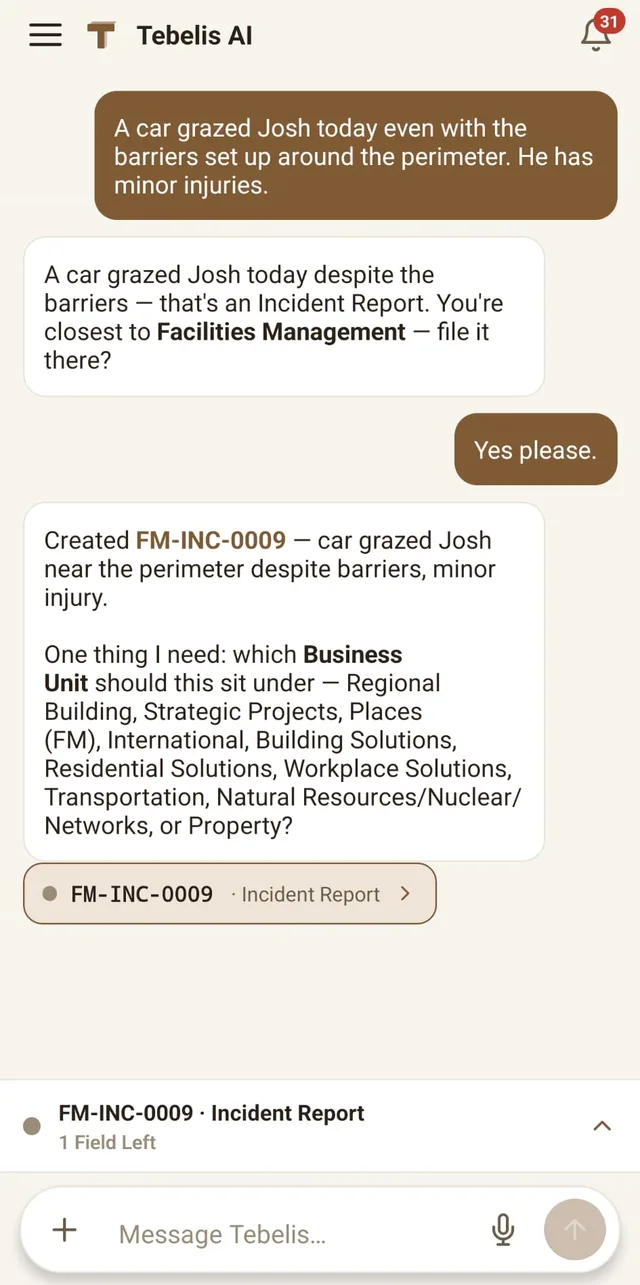
Report by voice
Dictate or type what you saw. The agent picks the right form, fills it in, and asks only for what's missing.
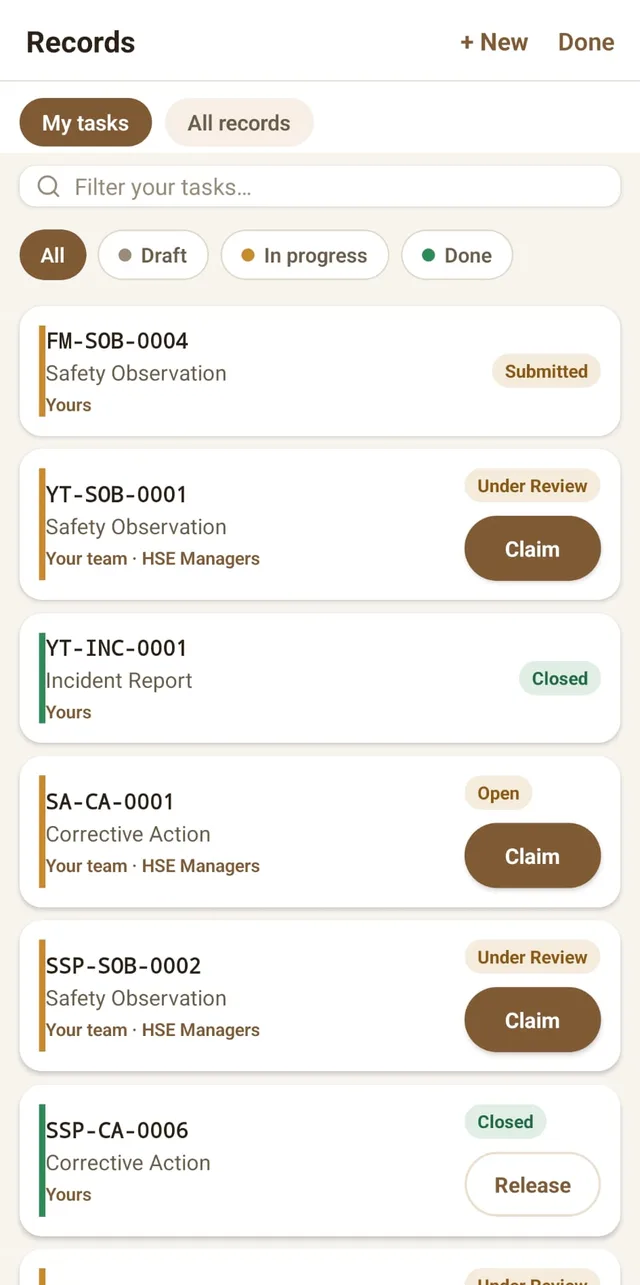
Your tasks follow you
Approvals, reworks and hand-offs land in your queue with a notification. Claim and act in two taps.
No signal? Keep working
Jot notes and photos offline on site; finish the record/form with the agent once you're back online.


Apple, the Apple logo, App Store, Google Play and the Google Play logo are trademarks of their respective owners.

Describe a form and the agent builds it
Tell the agent what a record/form is for: "daily concrete pour with a slump test and a corrective-action field that only shows when it's out of range". It assembles the template, the fields and the conditional rules. You review and publish.
- Fields, types & conditional rules
- Workflow states and owners
- Edit by asking, or by hand
From one sentence to a filled-in form
A worker takes a photo or types a sentence. Tebelis drafts the record/form with the right template, fields, severity and location, then says exactly what's still missing before it's submitted.
- Photo & voice capture
- Auto-filled from your own templates
- Submitted only when you say so
Ask for a chart and it lands on your dashboard
Ask in plain language, for example "add a cycle-time widget for the corrective action process", and the chart is added to a saved dashboard. Break records/forms down by their own fields, with exact counts.
- Charts on your own form fields, in the colours you set
- Cycle time per workflow step, so you can see where work stalls
- Filter the whole board, or click a chart to filter the rest
See which projects need you first
Open Tebelis and every project is already ranked by how much it needs your attention, with the reason why. One tap turns that into a plain-language brief of what to look at first, across the whole portfolio.
- Projects ranked by attention, automatically
- A one-tap AI "what needs you" digest
- No dashboards to build first
Ask about any project
Open a project and Tebelis writes a short briefing on how it's going, with the numbers behind it. Then ask a follow-up, such as "what's been sitting longest here?", and the agent lists the records/forms with their dates and owners and says who to chase first.
- A plain-language briefing on each project
- Follow-up questions answered from your own records/forms
- Reassign work from the same conversation
The agent works across the whole app,
with your permissions and no more
Ask it to build a template, fill in a record/form, assign work or set up a dashboard, and it does it in the app for you. Explore the platform
Templates with version history
Type "weekly safety inspection" or "daily food-hygiene check" and get a structured template with conditional rules. Editing publishes a new version; old records/forms keep the version they were filed under.
Voice and photo capture
Your team fills records/forms by voice, starts one from a photo, or asks the agent, in the iPhone and Android app.
Dashboards you choose who sees
Ask for "out-of-spec readings by location, last 30 days" and the chart is added to your dashboard. A dashboard stays private until you share it with specific people or groups.
Records/forms tied to locations
Turn on locations for a project and pin its records/forms to a place in your hierarchy: a building, a floor, a production line, a piece of equipment. Then find, filter and chart them by location.
A workflow for each template
Decide who owns each state, which transitions are allowed and what locks for editing. New work goes straight to the owners' task lists.
Who can do what
Four built-in roles (Admin, Manager, User, Viewer) plus your own custom roles. Groups can add access but never take it away. Give someone a whole division or region, or a single project.
Use our AI model,
or connect your own
The agent, its tools and your access rules work the same whichever model runs it, so switching models doesn't change who can see what.
Managed by Tebelis
Usage counts against your plan's AI allowance. When the allowance runs out, AI features pause, so there are no surprise bills.
Bring your own model
Connect Anthropic or OpenAI directly, or any OpenAI-compatible API at a public https address. Usage goes on your own key and we don't cap it. Test the connection before you save.
Three steps to get started
Drop in your structure
Create your projects. If you need them, add locations (site, building, floor, asset) and organisation levels such as divisions or regions.
Describe your work
Tell the agent what each record/form is for. It drafts the fields, rules and workflow, and you edit and publish.
Hand it to the crew
Your team signs in to the mobile app and fills forms by voice, photo or chat.
Use cases
The same building blocks work wherever your records/forms live: inspections, audits, checks, incidents, sign-offs. You define the templates, the terms and the standards.
Pricing
Standard and Pro seats are billed monthly, per seat. Add as few or as many as you need. Members without a paid seat stay free as view-only Viewers.
Security
Access is checked in the application and again inside the database. If one check ever failed, the other would still keep data from crossing between workspaces.
Common questions
What can the agent actually do?
What industries does Tebelis work for?
Which AI models can it run on?
How is our data kept apart from other customers'?
What stops a malicious doc from telling the agent to send data somewhere?
Do you train on our data?
Can we run the AI on our own cloud?
Try it with
your own forms.
Starting is free and needs no card. Describe the first form you need and see what Tebelis builds.